Since I wanted to do a new redesign, make a new blog, and in general do a full “rebrand,” I needed some way to keep track of it all. Given that I only need something for my own tasks, I wanted something simple and free that I could manage anywhere, thus I turned to Trello.
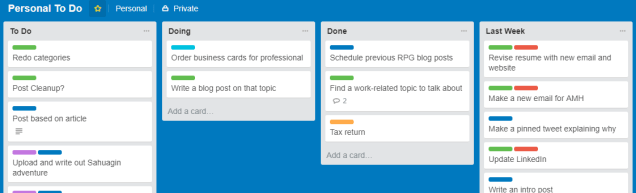
For those who may not be familiar, Trello is a simple task management tool that simulates the “Kanban” style of workflow: In this case like note cards moved around on a board, with what column they’re in representing their status.
For my board, any new task goes under “To Do,” and tagged with a Label (those colored bars on the card) indicating category (e.g. which blog it’s for, if it’s for real-life, or important). The things that I am to have done in the next day or so gets moved into “Doing” so I know what my short-term goals are. Once they’re done, they get moved to the next column and stay there for a week.
The final column, “Last Week” isn’t very necessary, but does give some perspective. Every week, I’ll move all the tasks that I got done over one column to the final one. This way, I can see both what I accomplished, and how it stacks up to the current week’s status. This helps me to stay motivated to complete these sort of “intangible” tasks, where there’s no concrete benefit to doing them.
Having some way to stay organized is really important so that tasks don’t get lost. Trello works well for me, but I’ve also found Google Keep useful if you need more of something that’s easy to put into a checklist, or a Calendar app if there’s a lot of tasks that have to be done on a timed basis.
 Always More Hats