Day 3 was by far the most useful day, covering a lot of the information I had yet to learn, mainly focussing advanced workflow concepts and properly managing the users using roles and permissions. This was, by far, the most informative and useful day of training, covering a lot of how to customize a Jira instance.
Project Management
Jira Training – Day 2
Day 2 was filled with a lot of issues. Mostly learning about them. We covered just about everything that issues could apply to that we didn’t cover on day one. Basically, everything except roles and components in this diagram has been covered.
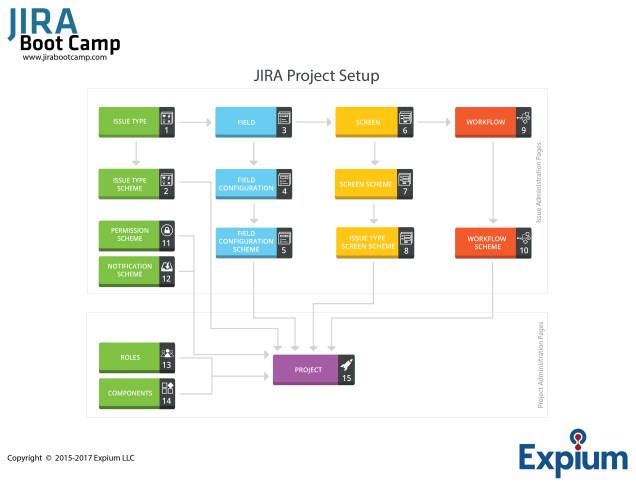
The training today was filled with everything about the issues. How they link, the difference between an Epic Link, Sub-Task Link, and other, “semantic” issue links. It covered searching for issues, adding custom fields, viewing those fields in various screens, and how to change field configurations.
The afternoon was mostly filled with one large workshop just configuring an entire project, with new and existing issue types, workflows, and screens. I ended up being a secondary instructor for some of the other people in the lecture, given my baseline understanding of how Jira works, so that those near me could complete the workshop.
What I learned today
- Secondary fields on issues
Votes could actually be pretty useful, and time tracking could maybe help as well, at least as far as debugging when a task has been forgotten as opposed to just being more difficult than anticipated. - Screens and how to associate them
This was something I had sort of figured out already, but getting some more information on how to properly use and configure it was great. - Field Configurations are not user-friendly
Using the descriptions for the Field Configuration itself is pretty necessary because of it. - Advice for Certification
Certification may be a good thing to pick up for professional development, but it will also likely require more studying than I had originally anticipated.
Overall, today had a good mix of new vs old information, with a lot of it giving me good ideas on how we could potentially improve our own usage of it. I’m looking forward to the next day, which should be mostly new information, including some stuff that was alluded to (like transition control based on issue fields).
 Always More Hats